[May'24]
Transfer Learning with MobileNet
In this project, I utilized a pre-trained model to customize my own model efficiently and cost-effectively. The pre-trained model I used is MobileNetV2, which is known for its fast and computationally efficient performance. MobileNetV2 has been pre-trained on ImageNet, a dataset containing over 14 million images and 1000 classes.
1. Create the Dataset and Split it into Training and Validation Sets
When training and evaluating deep learning models in Keras, generating a dataset from image files stored on disk is simple and fast. I read from the directory and created both training and validation datasets with images for either havinga a Alpaca or Not having an Alpaca.
If specifying a validation split, it's crucial to set the subset for each portion. The training
set was designated with subset='training' and the validation set with
subset='validation'. I ensured that the seeds were set to match each other,
preventing overlap between the training and validation sets.
2. Preprocess and Augment Training Data
I used dataset.prefetch to avoid memory bottlenecks when reading from disk.
Prefetching sets aside some data and keeps it ready for when it's needed, by creating a source
dataset from the input data, applying a transformation to preprocess it, then iterating over the
dataset one element at a time. This streaming process prevents the data from needing to fit into
memory.
I used
tf.data.experimental.AUTOTUNE to choose the parameters automatically. Autotune
dynamically tuned the value at runtime, optimizing CPU allocation across all tunable operations.
To increase diversity in the training set and help my model learn the data better, I augmented the images by randomly flipping and rotating them using Keras' Sequential API, which offers straightforward methods for these kinds of data augmentations with built-in, customizable preprocessing layers. These layers are saved with the rest of the model and can be re-used later.
3. Using MobileNetV2 for Transfer Learning
MobileNetV2, trained on ImageNet, is optimized for mobile and other low-power applications. It's 155 layers deep and very efficient for object detection, image segmentation tasks, and classification tasks like this one. The architecture has three defining characteristics:
- Depthwise separable convolutions
- Thin input and output bottlenecks between layers
- Shortcut connections between bottleneck layers
3.1 Inside a MobileNetV2 Convolutional Building Block
MobileNetV2 uses depthwise separable convolutions as efficient building blocks. Traditional convolutions are often resource-intensive, but depthwise separable convolutions reduce the number of trainable parameters and operations, speeding up convolutions in two steps:
- The first step calculates an intermediate result by convolving on each of the channels independently, known as the depthwise convolution.
- The second step merges the outputs of the previous step into one through another convolution, known as the pointwise convolution. This results in a single output from a single feature at a time and applies it to all the filters in the output layer.
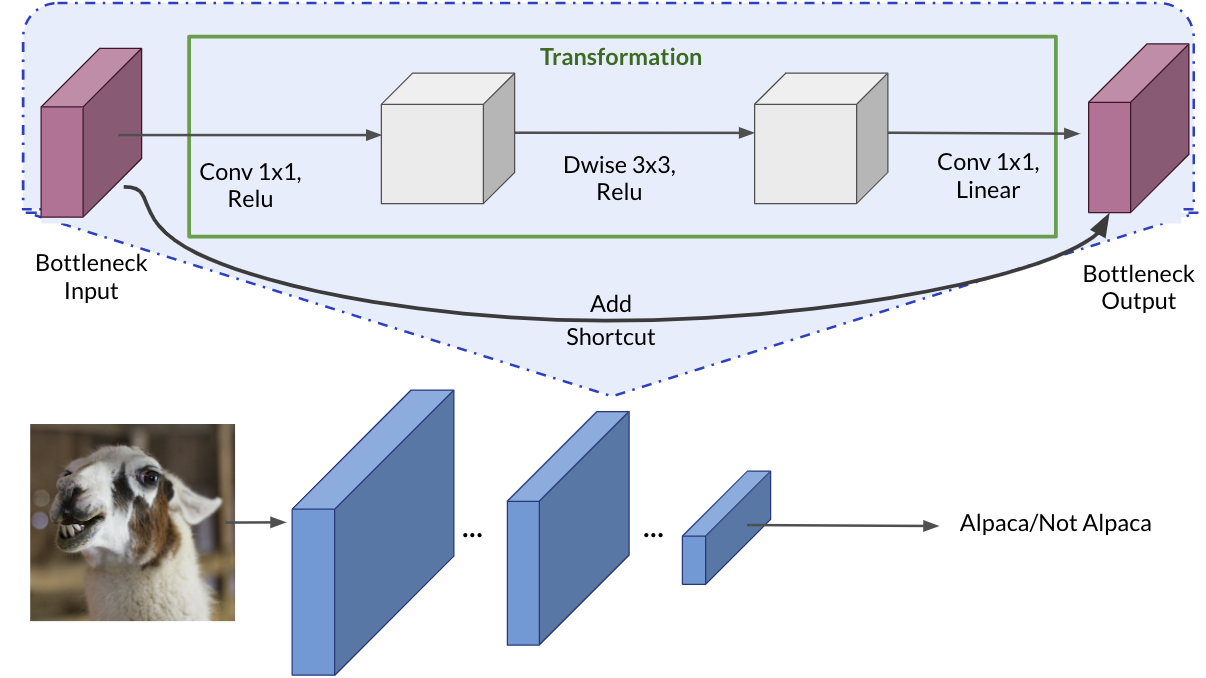
Each block consists of an inverted residual structure with a bottleneck at each end. These bottlenecks encode the intermediate inputs and outputs in a low-dimensional space, preventing non-linearities from destroying important information. Shortcut connections, similar to those in traditional residual networks, speed up training and improve predictions by skipping over intermediate convolutions and connecting the bottleneck layers.
3.2 Layer Freezing with the Functional API
I modified the classifier task to recognize alpacas using a pretrained model in three steps:
- Deleted the top layer (the classification layer)
- Set
include_topinbase_modelas False - Added a new classifier layer
I trained only one layer by freezing the rest of the network:
- Set
base_model.trainable=Falseto avoid changing the weights and trained only the new layer - The new layer replaces the top layer of MobileNetV2 and gives 1 dimentional output vector as a binary classifier only needs one
- Set
traininginbase_modelto False to avoid keeping track of statistics in the batch norm layer
3.3 Fine-tuning the Model
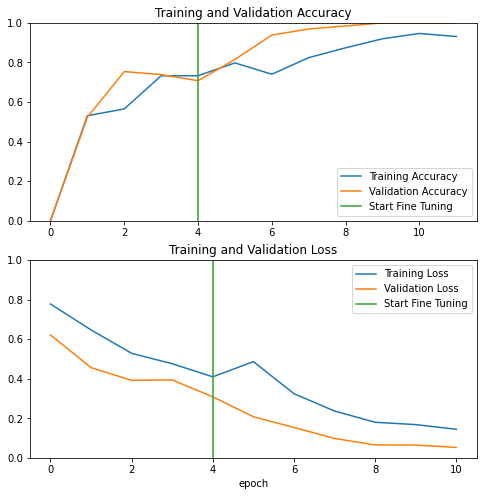
Fine-tuning the model involved re-running the optimizer on the last layers to improve accuracy. By using a smaller learning rate, I adapted the model more closely to the new data. This involved unfreezing the layers at the end of the network and re-training the final layers with a very low learning rate.
The intuition here is that the earlier stages of the network train on low-level features like edges, while the later layers capture high-level features like wispy hair or pointy ears. For transfer learning, the low-level features remain the same, but the high-level features need to adapt to the new data. This is like letting the network learn to detect features more related to your data, such as soft fur or big teeth.
To achieve this, I unfroze the final layers and re-ran the optimizer with a smaller learning rate while keeping all other layers frozen. The exact starting point for the final layers is arbitrary, and I experimented with different values to find the optimal setup. The key takeaway is that the later layers contain the fine details specific to the problem.
First, I unfroze the base model by setting base_model.trainable=True, chose a layer
to fine-tune from, then re-froze all the layers before it. I ran the model for a few more epochs
and observed an improvement in accuracy.
Results
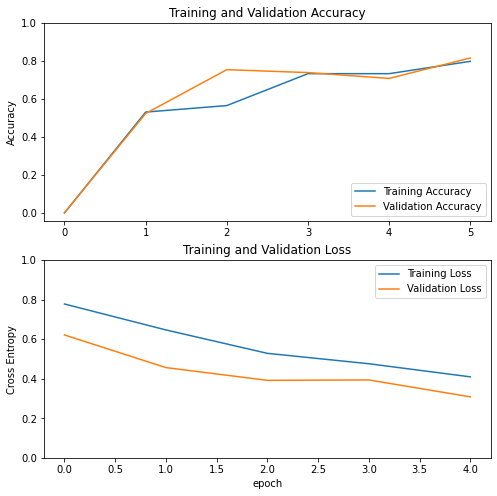
Before Fine-tuning:
After Fine-tuning:
Total params: 3,538,984
Trainable params: 3,504,872
Non-trainable params: 34,112
Conclusion
In this project, I accomplished the following:
- Created a dataset from a directory
- Augmented data with the Sequential API
- Adapted a pretrained model to new data with the Functional API and MobileNetV2
- Fine-tuned the classifier's final layers and boosted the model's accuracy